What Puffin Proxy does
Everything below describes what the app does today. Features that are not finished are marked Coming soon.
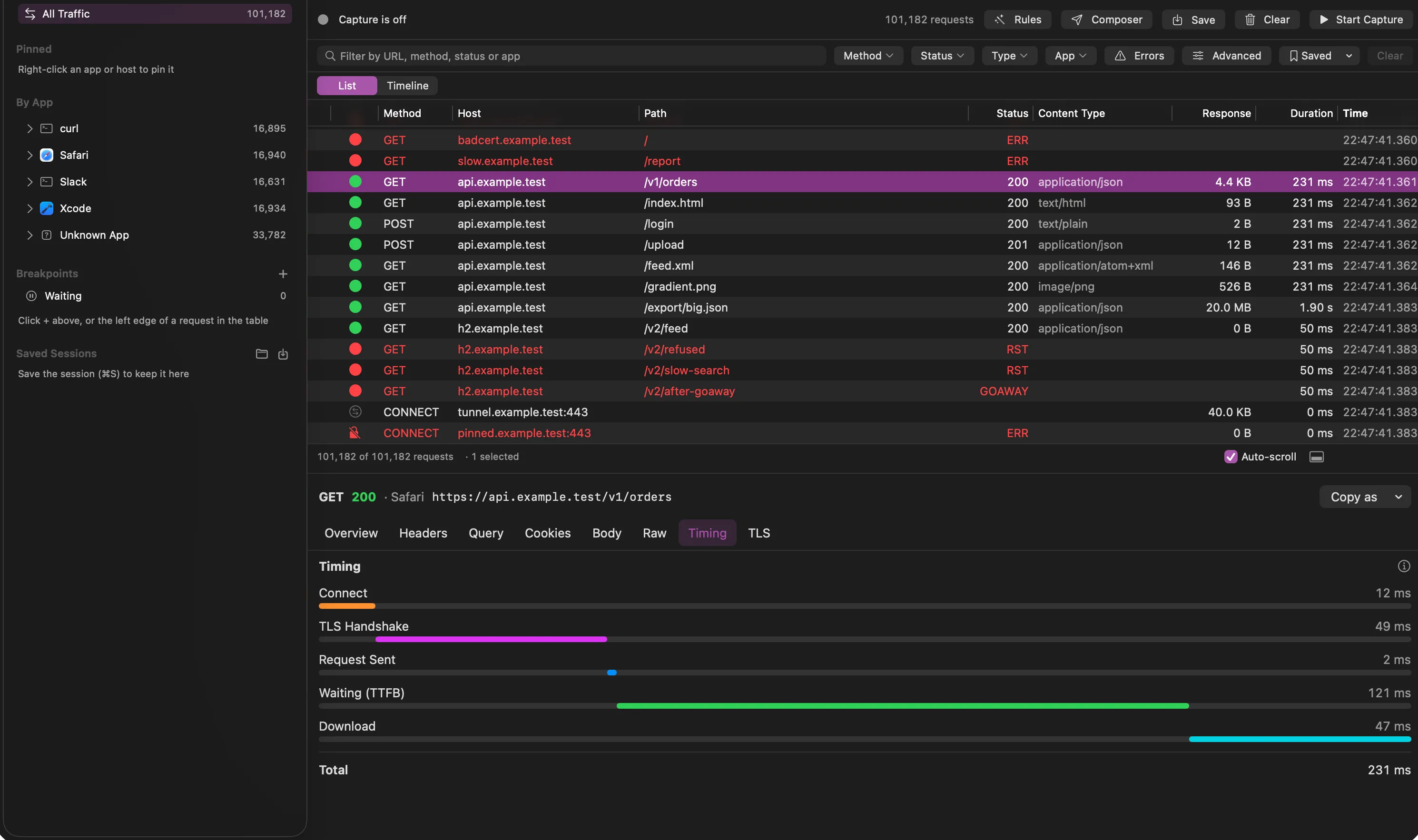
Capture and targeting
A Network Extension claims connections, so you do not configure a proxy in each app.
- Capture the apps you select, or everything except the apps you exclude.
- Add a domain include or exclude list on top of app targeting.
- Ports 80 and 443 by default, with more ports configurable.
- Every flow records the app, host, port and timing. Non-HTTP traffic shows up as a tunnel with byte counts.
- Untargeted apps are never claimed, so they keep their normal network path.
- Pause capture from the menu bar or with the ⌃⌥⌘P shortcut.
- Block QUIC (UDP port 443) for targeted apps, on by default, so they fall back to TCP, which Puffin can inspect.
HTTPS and your own certificate authority
Puffin creates a root certificate unique to your install and decrypts only what you choose.
- The root key lives in your login Keychain and never leaves your Mac. One click removes it.
- Certificates for each host are issued on the fly and cached.
- Decryption is opt-in: list the hosts to decrypt, and everything else is tunneled with only host and byte counts recorded.
- Puffin checks the real server’s certificate. You can allow an invalid certificate for a single host.
- If an app refuses Puffin’s certificate, the host is flagged as likely pinned, with a one-click bypass.
- A TLS tab shows the version, cipher, ALPN and the upstream certificate chain.
HTTP/1.1, HTTP/2 and WebSocket
Each protocol is shown the way you think about it.
- HTTP/1.1 with keep-alive, chunked bodies, 100-continue and CONNECT.
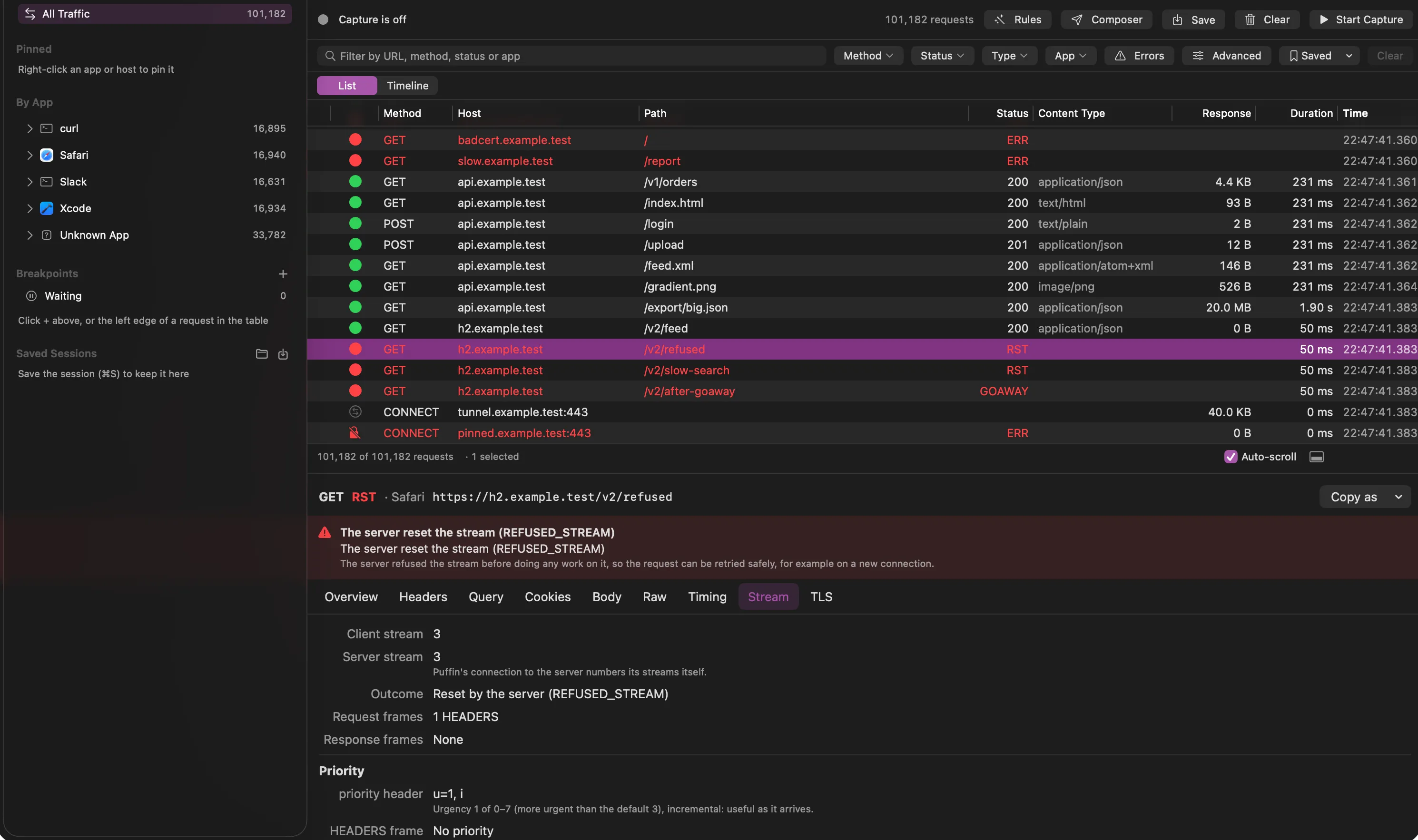
- HTTP/2 with one transaction per stream. Resets and GOAWAY are recorded as errors, with a plain-language explanation of each error code.
- A Stream tab shows each HTTP/2 stream’s IDs, priority, frame counts and how it ended, plus both sides’ settings.
- WebSocket messages are assembled from frames and listed with direction, type, size and close code, including compressed (permessage-deflate) messages and WebSocket over HTTP/2.
- Bodies are stored exactly as they were sent and decoded for display: gzip, deflate, Brotli and zstd.
Traffic table and inspector
A native table built to stay smooth with more than 100,000 rows.
- A sidebar groups traffic by app and host, with pinned items.
- Sort and customize columns, and filter by text, method, status class, content type, app, or errors only.
- An advanced filter combines conditions on sizes, durations, status codes, headers and body contents, and saves with your other filters.
- Tabs for Overview, Headers, Query, Cookies, Body, Raw, Timing and TLS.
- Body viewers for text, JSON, XML and HTML, forms, multipart, images and hex. Large bodies load lazily, and you can search inside a body.
- Timing shows each phase it can observe, with built-in help. A Timeline view draws requests as a waterfall over time.
- Compare two requests side by side, with structural JSON differences.
- Pick a host or app in the sidebar for a summary: status breakdown, latency percentiles and its slowest and largest endpoints.
- Failures are explicit: connect error, TLS failure, client abort or timeout.
Sessions and export
Keep what you captured and hand it to other tools.
- Save a session with ⌘S. Saved sessions are listed in the sidebar and open in place of live traffic, without changing the saved file.
- Redact secrets when saving or exporting: authorization headers, cookies, and the header names, query parameters and JSON keys you choose.
- Export HAR 1.2 for all traffic or a selection, and import HAR files, including ones from browsers.
- Copy any request as cURL or as code: JavaScript, Node, Python, Swift, Go, Kotlin, Java, Ruby, PHP, PowerShell, HTTPie and wget.
- Set caps on stored requests and body size, and clear the list at any time.
iOS Simulator
Capture simulator apps like any other process.
- Traffic is labelled by simulator device.
- Install Puffin’s certificate into booted simulators with one button, and see which simulators are still missing it.
- Choose “all Simulator apps” as a targeting option.
Setup, health and uninstall
A checklist walks you through first run, and a health panel shows what is wrong.
- The first-run checklist covers moving the app to Applications, approving the system extension, allowing the proxy configuration, and creating and trusting the certificate.
- The health panel shows the extension, proxy configuration, engine and certificate trust, each with a fix button.
- Uninstall removes the extension and configuration, and deletes and untrusts the certificate.
- A copy button gives you environment variables for tools that ignore the Keychain, such as Node and Python.
Rules
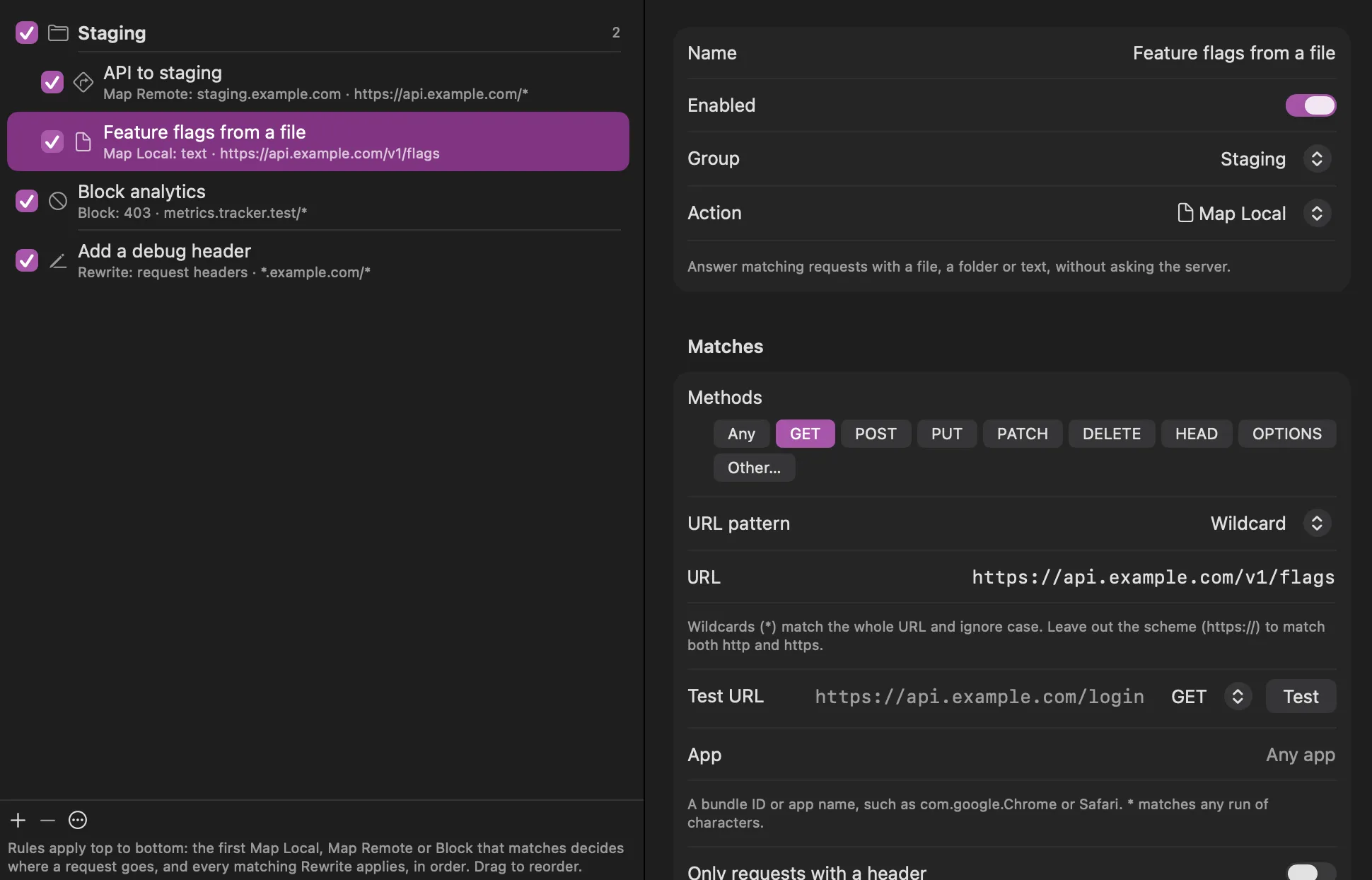
Change traffic on its way through: Map Local, Map Remote, Block and Rewrite.
- Map Local answers a request from a file, a folder or text, without asking the server.
- Map Remote sends a request to another host, port or path, for example from production to staging.
- Block answers with a status of your choice, or drops the connection.
- Rewrite edits request and response headers, query parameters, bodies and status codes.
- Match on URL (wildcard or regular expression), method, app and a header. A test field shows whether a URL matches.
- Rules run top to bottom and can be grouped and switched on and off. Requests a rule changed are marked in the table.
- Create Map Local and Map Remote rules from a captured request in one click.
Breakpoints
Pause a request or response, edit it, then let it continue.
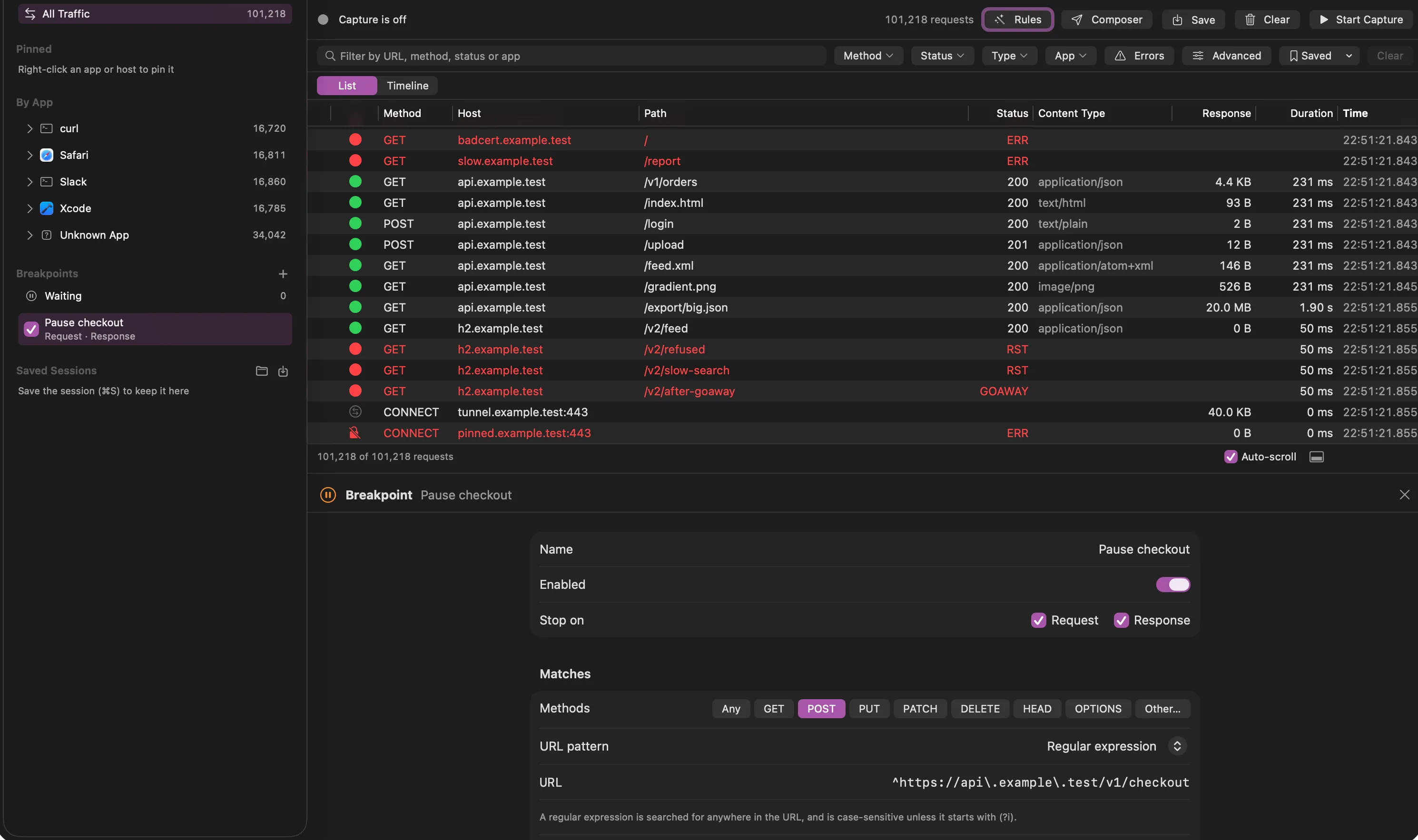
- Stop on the request, the response or both, for the URLs, methods and apps you choose.
- Edit the method, URL, headers and body of a paused request, or the status, headers and body of a paused response.
- Continue, abort or drop the exchange. Anything left waiting continues on its own after a timeout.
- Paused requests are edited in the main window, next to the traffic around them. HTTP/2 streams pause independently.
- Add a breakpoint from any request, or by clicking the left edge of its row.
- The menu bar shows when requests are waiting, and Puffin can notify you when it is in the background.
Replay and compose
Resend a request, edit it first, or write one from scratch.
- Replay any captured request, or edit it and send it again.
- The Composer builds a request with a method, URL, headers you can switch off, and a raw, JSON or form body.
- Repeat a request many times with a concurrency limit.
- Sent requests appear in the traffic list like captured ones, and their responses open in the inspector. The Composer keeps a history.
- Choose whether your rules apply to what you send.
Signed downloads and updates
A notarized download that installs on a fresh Mac.
- Planned: Developer ID signing and notarization, automatic updates, a DMG, a Homebrew cask and a universal binary.
- Until then there is no public download.
What Puffin does not do
| Area | Status |
|---|---|
| HTTP/3 and QUIC | Not decrypted. Puffin blocks UDP port 443 for captured apps so they fall back to TCP. |
| Certificate pinning | Not bypassed. Pinned hosts are detected and tunneled without decryption. |
| Non-HTTP TCP | Not decoded. Shown as a tunnel with byte counts. |
| Physical iOS devices | Not in the first release. The iOS Simulator is supported. |
| Throttling and scripting | Not in the first release. |
| Mac App Store | Not planned. Distribution will be a direct download. |